
If you spend any time scrolling through tech news, you know Claude AI by Anthropic is hogging the entire spotlight. From advanced logical reasoning to writing entire script architectures on autopilot, it has quickly become the favorite tool of top-tier engineers and digital architects.

But for everyday business owners and solo entrepreneurs, a massive problem remains: How do you actually use this power to run your business without staring at a terminal window or copy-pasting text all day?
The answer is Make.com. By combining Claude’s advanced intelligence with Make’s visual drag-and-drop automation builder, you can build autonomous, self-running workflows that manage your data, marketing, and operations in the background around the clock.
The 2026 Quick Summary: You don’t need a degree in software engineering to deploy advanced AI agents. By connecting the native Anthropic Claude module inside Make.com, you can instantly route your emails, spreadsheets, and CRMs straight through the world’s most powerful reasoning engine on a completely visual canvas.
Why is Everyone Hyped Up About Claude?
Most standard chatbots are great at simple text summaries, but they struggle when given massive, complex instruction lists. Claude is fundamentally different:
- Deep Logical Reasoning: It understands context, nuances, and brand voice better than almost any model on the market, meaning its outputs sound incredibly human.
- Massive Information Windows: It can read and analyze giant payloads of data—like an entire customer data spreadsheet or a 50-page contract—without forgetting its original instructions.
- Agentic Automation: Instead of just answering questions, Claude can use Make.com as its “hands and feet” to physically execute tasks across your favorite apps.
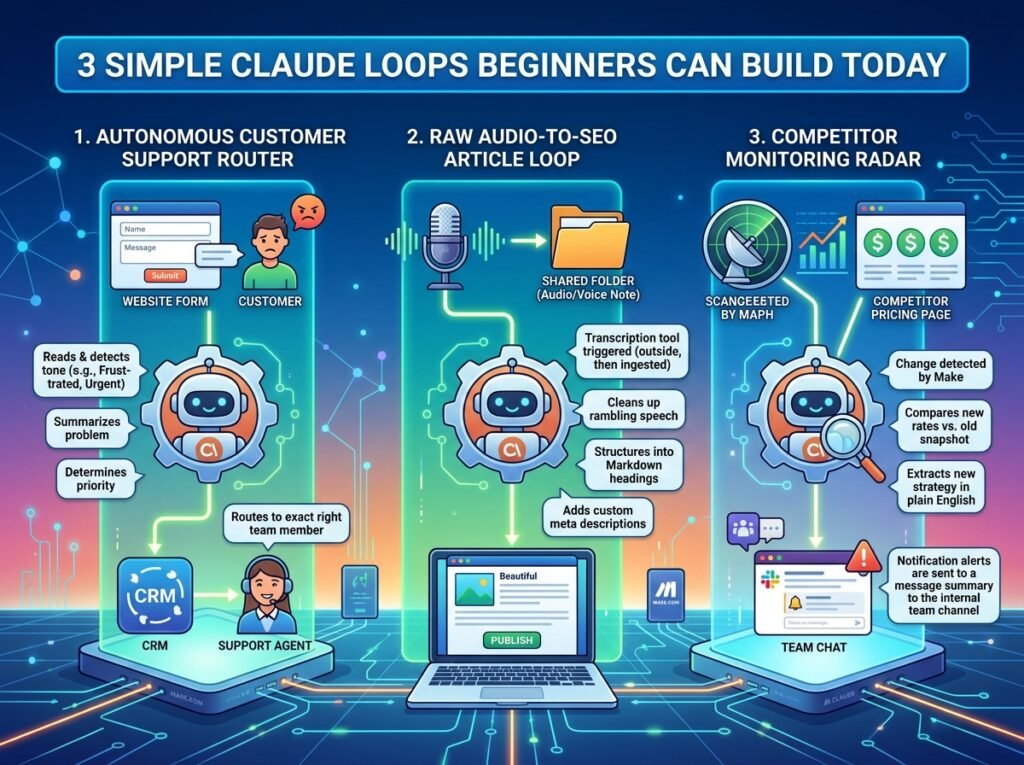
3 Simple Claude Loops Beginners Can Build Today
To show you how easy it is to bridge the gap between hype and practical business results, here are three beginner-friendly automation loops you can build inside Make.com right now:
1. The Autonomous Customer Support Router
- The Step: A customer submits an inquiry or complaint on your website.
- The Claude Loop: Make intercepts the message and passes it to Claude. Claude reads the message, detects the emotional tone (frustrated, curious, urgent), summarizes the problem, and automatically routes it to the exact right team member inside your CRM with a pre-drafted response ready to send.
2. The Raw Audio-to-SEO Article Loop
- The Step: You drop a raw voice note or an audio interview into a shared folder.
- The Claude Loop: Make triggers a transcription tool, sends the raw text payload to Claude, and instructs it to clean up the rambling speech, structure it into beautiful Markdown headings, add custom meta descriptions, and output a pristine, publication-ready blog post.
3. The Competitor Monitoring Radar
- The Step: A tracker monitors your main competitor’s public pricing page.
- The Claude Loop: If a change is detected, Make pulls the updated data and hands it to Claude. Claude compares the new rates against the old snapshot, extracts their new strategy in plain English, and pings your internal team channel with an automated alert breakdown.
How to Set It Up in 3 Simple Steps
Getting started doesn’t require a single line of backend code:
- Get Your Account: Set up a free workspace on Make.com to act as your central automation dashboard.
- Link the Anthropic Module: In the visual builder, click the “+” button, search for the native Anthropic Claude module, and paste in your API key from your Anthropic dashboard.
- Map Your Data: Use Make’s clean interface to drag data variables from your spreadsheets or web forms directly into Claude’s prompt box, turn the scenario “On,” and let the system run completely on autopilot.
Stop treating AI like a simple chatbot window. Turn your business into an automated powerhouse by letting Claude handle your heavy operational lifting today.